 Orderverse Docs
Customer Activity
Track link opens, confirmations, verifications, checkout starts, and order submissions per customer.
Overview
The Customer Activity page shows engagement data for every customer across their order portal link.
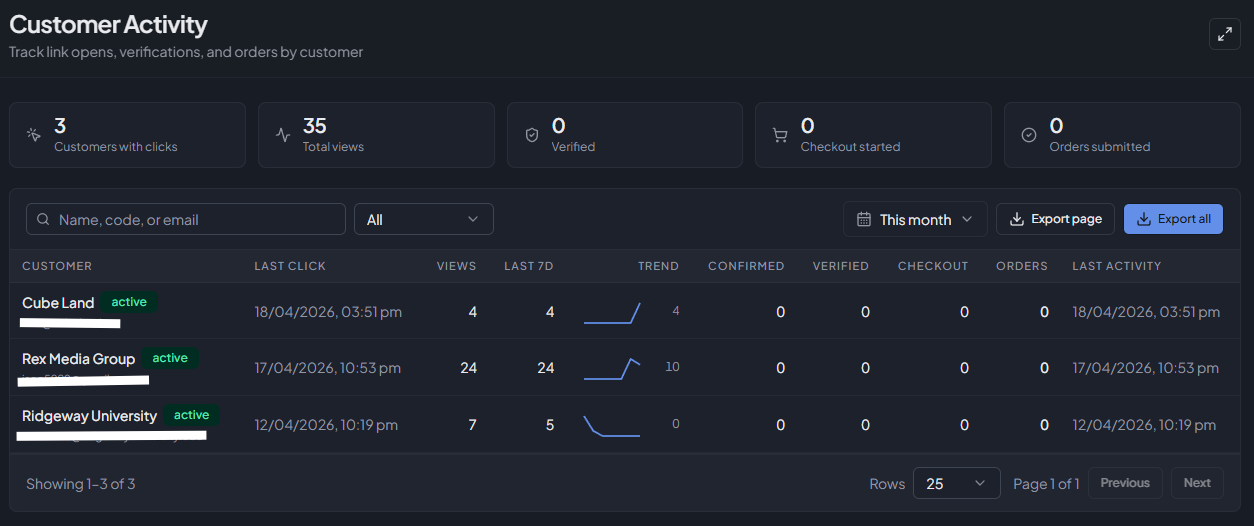 Use it to see which customers are actively browsing, which have stalled before checkout, and which have
recently placed orders.
Use it to see which customers are actively browsing, which have stalled before checkout, and which have
recently placed orders.
Navigate here from Customers → Activity in the sidebar.
This page is visible to workspace admins only.
Summary bar
Five counters at the top of the page summarise the filtered dataset:
| Counter | What it counts |
|---|---|
| Customers with clicks | Distinct customers who opened their order link at least once in the selected period. |
| Total views | Total number of link-open events across all customers. |
| Verified | Times a buyer completed Strict Security Mode verification (image-match challenge). |
| Checkout started | Times a buyer reached the checkout screen. |
| Orders submitted | Total orders submitted through the portal. |
Filters
| Filter | Description |
|---|---|
| Search | Filter by customer name, code, or email. |
| Status | Show All, Active, or Inactive customers only. |
| Date range | Preset periods (Today, This week, This month, Last 30 days, etc.) or a custom date range. Counts in each row reflect the selected period. |
Table columns
| Column | Description |
|---|---|
| Customer | Customer name and code (if set). Click a row to open the customer detail panel. |
| Customer email address. | |
| Status | Active or Inactive badge. |
| Last click | Timestamp of the most recent order link open. |
| Views | Total link-open count in the selected period. |
| 7-day trend | Sparkline showing daily link opens for the last seven days, with the latest day's count. |
| Confirmed | Times the buyer clicked through the confirmation welcome screen. |
| Verified | Times the buyer passed a Strict Security Mode challenge. |
| Checkout | Times the buyer reached checkout. |
| Orders | Orders submitted through the order portal. |
| Recent activity | Timestamp of the most recent event of any type. |
Exporting data
Two export options are available via the Export button:
| Option | What is exported |
|---|---|
| Export current page | The rows currently visible (respects active filters and page size). |
| Export all results | Every row matching the current filters, regardless of page. |
Both options download a CSV file named customer-activity-YYYY-MM-DD.csv.
Customer detail drill-down
Click any row to open the Customer Detail panel directly to its Activity tab. The Activity tab shows the last 30 days of engagement for that specific customer:
- Summary cards — Views, Verified, Checkout, and Orders counts.
- 14-day trend chart — Daily link-open counts plotted as a line chart.
- Recent events — A timestamped list of the latest confirmation, verification, checkout, and order milestones.
See Customer Detail for the full panel reference.