 Orderverse Docs
Business Profile
Set your business name, logo, contact details, business registration number, and regional currency and timezone settings.
Overview
The Business Profile tab holds the core identity of your workspace — the information that appears on customer-facing order pages, invoices, and emails.
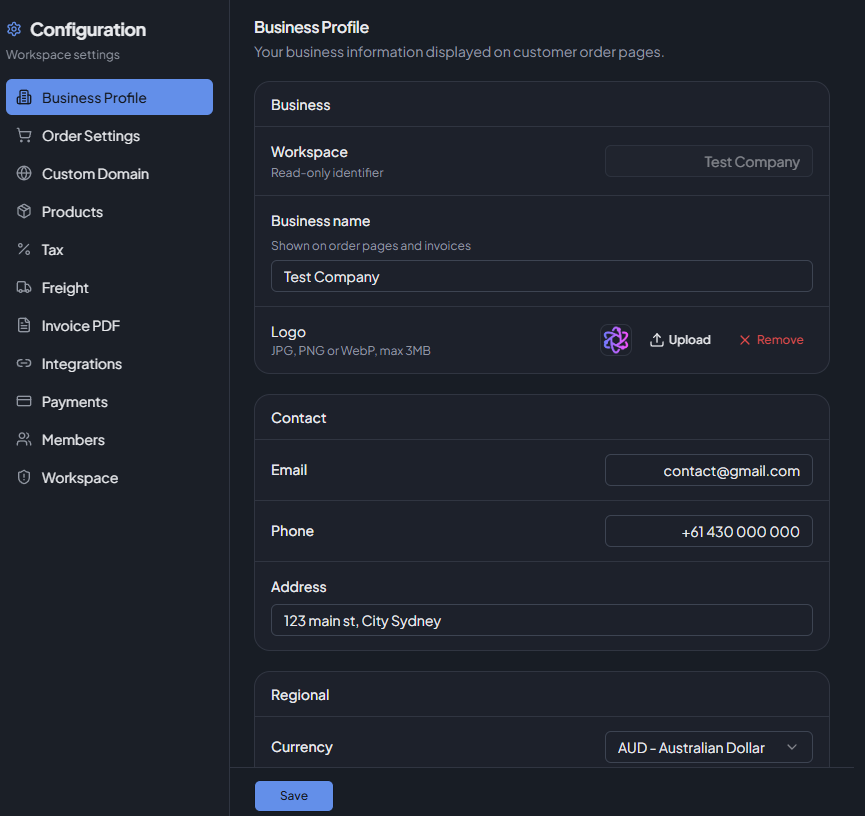
Only Admins and Owners can access Configuration settings.
Workspace Name
Your workspace identifier. This is read-only and cannot be changed from this page. It is set when the workspace is first created.
Business Name
The trading name displayed on customer order pages and on invoices. This is the name your customers see, and it can differ from the workspace name.
Business Name is required — saving is blocked if left empty.
Logo
Your company logo displayed in the storefront and on invoices.
| Setting | Details |
|---|---|
| Formats | JPG, PNG, WebP |
| Max size | 3 MB |
| Upload | Click Upload to select a file. The logo is saved immediately. |
| Remove | Click Remove to delete the current logo. |
Uploading a new logo automatically replaces the previous one.
Contact Information
Optional contact details shown on customer-facing pages.
| Field | Description |
|---|---|
| Contact email address. | |
| Phone | Phone number in any format. |
| Address | Physical business address. |
Business Registration Number
Your business registration number is printed on all invoices. The field label and requirements depend on your workspace country.
Australian workspaces (AU)
| Field | Label on invoices | Required |
|---|---|---|
| ABN | ABN | No |
Enter your Australian Business Number. Example format: 12 345 678 901.
If left empty, the ABN line is omitted from invoices.
New Zealand workspaces (NZ)
| Field | Label on invoices | Required |
|---|---|---|
| GST Number | GST number | Yes |
| NZBN | NZBN | No |
Enter your GST registration number. Example format: 123-456-789. Saving is
blocked if this field is empty.
The NZBN field is optional. If provided, it appears on invoices on a separate
line below the GST number. Example: 9429041234567.
Changing these values affects invoices generated or regenerated after the save. Previously issued invoices are not updated automatically.
Regional Settings
| Setting | Options |
|---|---|
| Default Currency | AUD, NZD, USD |
| Timezone | UTC, Australia/Sydney, Australia/Melbourne, Australia/Brisbane, Australia/Perth, Pacific/Auckland, America/Los_Angeles, America/New_York |
The timezone affects how dates and times are displayed throughout the dashboard and on documents.
Saving
Click Save Changes to apply all updates. The logo is saved immediately on upload — the rest of the form requires clicking Save.