 Orderverse Docs
Products
Enable product families and bundles, and configure which units of measure are available workspace-wide.
Overview
The Products tab controls Product Variants, Bundle Products, and the unit-of-measure codes available across the workspace.
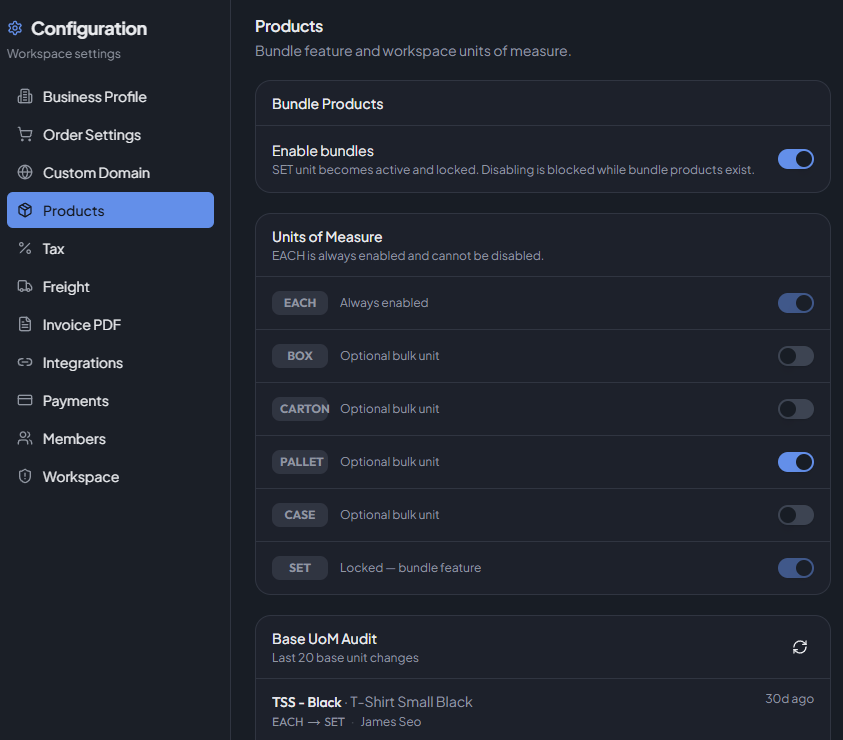
Multi-unit pricing must be enabled in Order Settings before UoM codes beyond EACH are meaningful.
Product Variants
Turn on Enable product families to group colour, size, or model choices under one buyer-facing product. Each combination remains a separate SKU with its own price, stock, status, and image.
When enabled, click Manage products to create and manage families from Products. Turning the setting off retains existing family data, but the families become read-only and are hidden from the buyer portal.
See Product Variants for the complete setup, publishing, archive, and restore workflow.
Bundle Products
When bundle products are enabled, the SET unit code is automatically activated and locked — it cannot be disabled while bundles are in use.
| State | Behaviour |
|---|---|
| Enabled | SET unit is auto-enabled and locked. Bundle products can be created. |
| Disabled | Blocked if bundle products already exist. Remove bundles first. |
Workspace Units
Controls which unit codes are available when setting up product UoMs.
Available unit codes (in display order):
| Code | Type | Notes |
|---|---|---|
| EACH | Required | Always enabled. Cannot be disabled. |
| BOX | Optional | Toggle on/off as needed. |
| CARTON | Optional | Toggle on/off as needed. |
| PALLET | Optional | Toggle on/off as needed. |
| CASE | Optional | Toggle on/off as needed. |
| SET | Bundle | Auto-enabled when bundle products are on; locked. |
Toggle a unit off to prevent it from being used in new product UoM configurations. Existing product UoMs are not affected.
Base UoM Audit Trail
Shows a log of the last 20 changes to a product's base unit of measure. When a product's base UoM is changed, all bundle products that reference it are affected — the audit trail shows these impacts.
Each entry shows:
| Field | Description |
|---|---|
| SKU / Product | The product whose base UoM changed. |
| Change | Previous base UoM → new base UoM. |
| Changed by | The user who made the change. |
| When | Relative time and absolute timestamp. |
| Impacted bundles | Count and list of bundle products affected by the change. |
Click Refresh to reload the audit log.