 Orderverse Docs
Workspace & Billing
View subscription status, cancel or resume your subscription, and manage workspace deletion.
Overview
The Workspace tab shows your current subscription status and gives the workspace Owner tools to manage the subscription lifecycle and request workspace deletion.
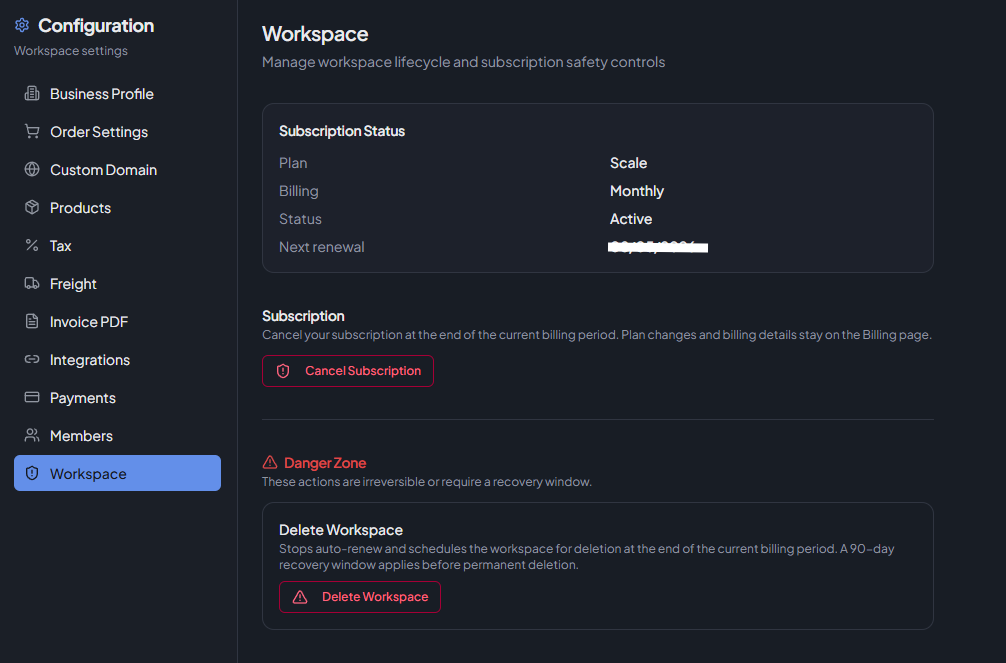
Only the workspace Owner can take actions on this tab. Admins can view the subscription status but cannot make changes.
If the workspace is suspended, only this tab is accessible in Configuration until billing is restored.
Subscription Status
A summary of the current billing state:
| Field | Description |
|---|---|
| Plan | The active plan code (e.g. Starter, Pro). |
| Billing | Billing interval — Monthly or Annual. |
| Status | Current billing status: Active, Cancel Scheduled, Past Due, Unpaid. |
| Next renewal / Access until | The next renewal date, or the last access date if cancellation is scheduled. |
| Deletion effective | Shown if a deletion request is pending. |
Cancel Subscription
Available when the subscription is active and no deletion request is pending.
Cancellation is scheduled — it takes effect at the end of the current billing period. You retain access until that date.
Click Cancel Subscription and confirm in the dialog.
Resume Subscription
Available when cancellation is scheduled (status: Cancel Scheduled).
Click Resume Subscription to reverse the cancellation. Auto-renewal is restored and the scheduled cancellation is removed.
Delete Workspace
Located in the Danger Zone section.
| What happens | Details |
|---|---|
| Auto-renew is stopped | No further charges after the current period. |
| Workspace is scheduled for deletion | Deletion becomes effective at the end of the current billing period. |
| Recovery window | A 90-day recovery window applies. You can restore the workspace within this period. |
| Permanent deletion | After the recovery window expires, all data is permanently deleted and cannot be recovered. |
Type the required confirmation text in the dialog to confirm.
Delete Workspace is not available if cancellation is already scheduled. Resume or let the subscription expire first.
Restore Workspace
Available after a deletion request has been made, within the recovery window.
Click Restore Workspace to cancel the deletion request. The workspace returns to its normal state.
The recovery window deadline is shown in the dialog and in the Deletion Requested notice.
Suspended workspace
If the workspace becomes suspended (e.g. due to a failed payment), access to Configuration is restricted to this tab only. Restore billing to regain full access.