 Orderverse Docs
Payments (Stripe)
Connect Stripe to accept card payments from customers at checkout.
Overview
The Payments tab manages the Stripe connection. When connected and active, customers can pay by card at checkout using the Pay now option.
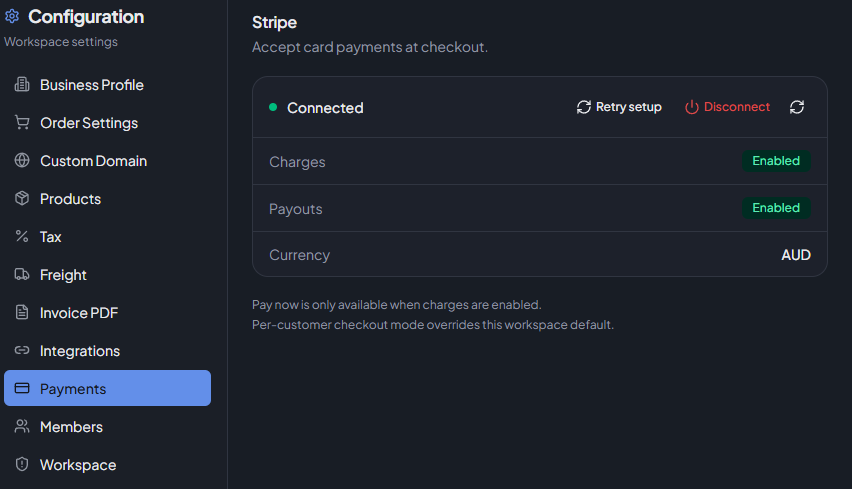
Connecting Stripe
Click Connect Stripe. You will be redirected to Stripe's onboarding flow (Stripe Express) to set up your account. After completing onboarding, you are returned to Orderverse and the connection status updates.
Connection Status
| Status | Description |
|---|---|
| Connected & Active | Charges and payouts are enabled. Customers can pay now. |
| Action Required | Connected but Stripe requirements are incomplete. Card payments are not available until resolved. |
| Not Connected | No Stripe account linked. Card payments are unavailable. |
Capability status
When connected, the following capabilities are shown:
| Capability | Description |
|---|---|
| Charges | Whether card charges are enabled on your Stripe account. |
| Payouts | Whether payouts to your bank are enabled. |
| Currency | The default currency on your Stripe account. |
Payouts showing as Disabled?
After completing Stripe onboarding, payouts may initially appear as Disabled. This is normal — Stripe can take a few moments to verify and activate payout capability.
Click Refresh or Retry Setup to reload the latest status from Stripe. If payouts remain disabled after a few minutes, log in to your Stripe Dashboard to check if any additional verification steps are required.
Actions
| Action | Description |
|---|---|
| Connect Stripe | Start the Stripe onboarding flow (shown when not connected). |
| Retry Onboarding | Resume incomplete onboarding (shown when connected but action is required). |
| Disconnect | Remove the Stripe connection. Card payments stop immediately. |
| Refresh | Reload the current status from Stripe. |
How Stripe is used
- Uses Stripe Express with destination charges.
- The Pay now checkout option is only shown to customers when charges are enabled.
- Webhook events must be configured for the connect and checkout endpoints (handled by Orderverse automatically during onboarding).
Checkout mode
The workspace checkout default (Pay now vs Pay later) is set in Order Settings. Even if the workspace default is Pay now, orders fall back to Pay later if Stripe is not connected or charges are not enabled.